
Rules
A Rule is a template-scoped business constraint of the form when [conditions] then [constraints]. Unlike a form-only validator, a rule is enforced synchronously in every write path — the entity form, the REST API, CSV import, and AI agents — so a record can never end up in a state the template disallows, regardless of which door it came through.
An empty when list makes a rule unconditional. That is how a plain required field is expressed: when: [] then: [attribute is not empty].
1. Anatomy of a Rule
Section titled “1. Anatomy of a Rule”- Name: shown in the template editor’s rule list (e.g.
Resolved incidents are documented). - Message: returned to the caller when the rule is violated (e.g.
Describe what happened and what was done before resolving the incident). - When (conditions): a list of predicates over the record’s current attribute values. All must hold for the rule to activate. Leave empty for a rule that always applies.
- Then (constraints): a list of predicates that must hold once the rule is active.
is not emptyon an attribute is the “required” constraint; any other operator narrows what values are acceptable.
Conditions and constraints share the same operator vocabulary:
| Operator | Meaning |
|---|---|
| Equals / Not Equals | exact match against a value or list option |
| Greater Than / At Least / Less Than / At Most | numeric or date ordering |
| Contains / Not Contains | substring match on text |
| Is One Of | membership in a set of list options |
| Is Empty / Is Not Empty | presence check — the basis of “required” |
Rules read the record’s current, effective state — never a change delta — and can only reference the template’s own dimensions, lists, and references. Metric attributes (time-series values) cannot be used in a condition or constraint, since rules judge a record’s state, not its telemetry.
2. Defining a Rule
Section titled “2. Defining a Rule”Rules are configured on the template itself, in the template editor’s Rules tab. The tab label shows how many rules the template has. A rule is saved as soon as you click Save in its dialog, so you don’t need to save the template afterwards. A template you are still creating has no Rules tab yet: save it first.
- Navigate to Blueprints → Template Library and open the template (e.g.
Incident). - Open the Rules tab.
- Click Add rule.
- Enter a Name and the Message shown when the rule is violated.
- Under When, click Add condition for each predicate the record must match to activate the rule (or leave it empty to always apply).
- Under Then, click Add constraint for each predicate that must then hold.
- Click Save.
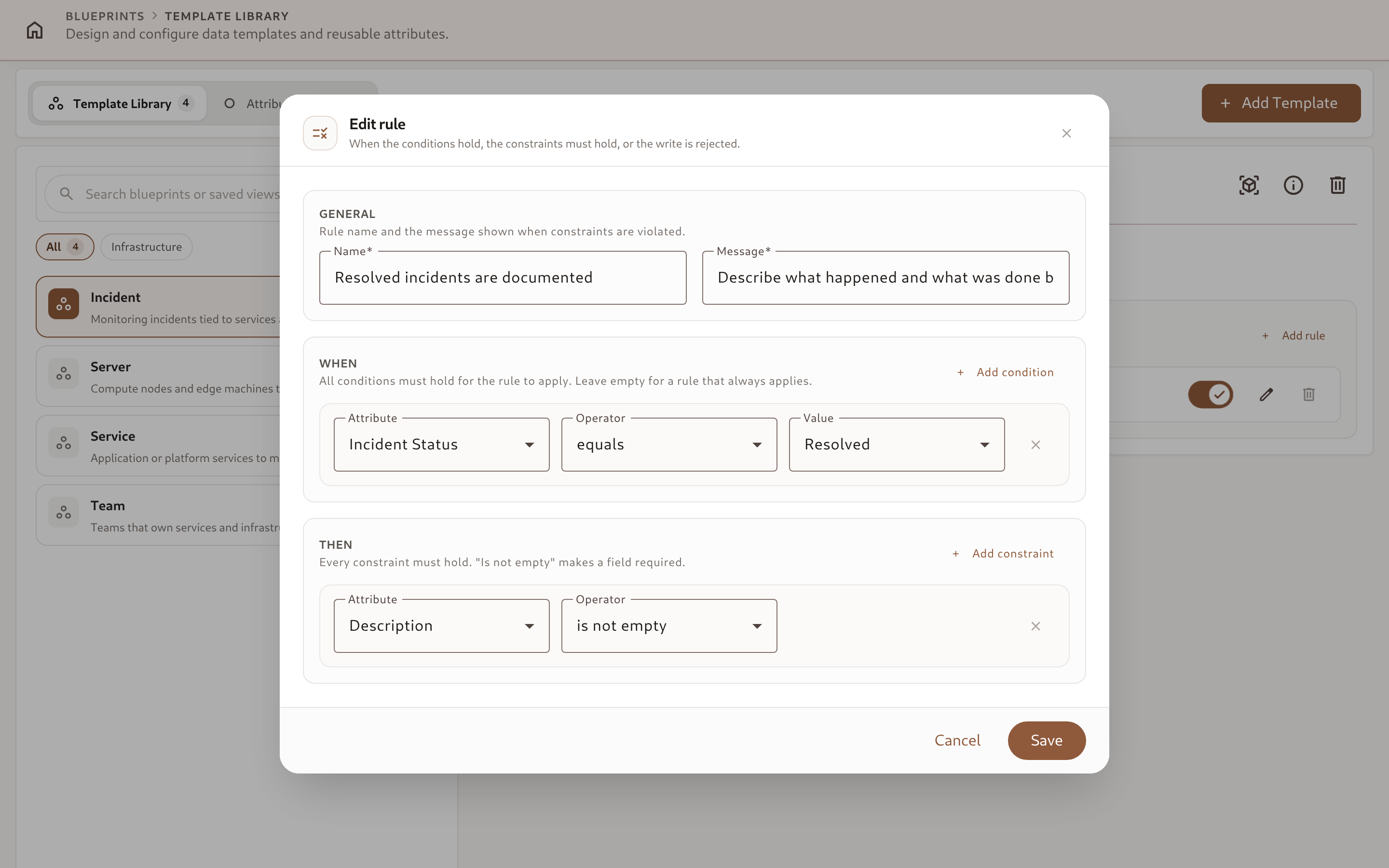
The example above is the Incident template’s Resolved incidents are documented rule from the Server Monitoring blueprint: incidents may sit in any status freely, but the moment Incident Status is set to Resolved, Description must be filled in — an incident can’t be closed out silently.
Each rule can be toggled off with the switch on its row without deleting it, and reordering does not matter: every enabled rule on the template is checked independently on every write.
The “Required” shortcut
Section titled “The “Required” shortcut”You rarely need to hand-build a rule just to make a field mandatory. On the Schema tab, each attribute’s menu under Template Attributes has a Required toggle — checking it creates exactly the degenerate rule described above (when: [], then: [that attribute is not empty]) named "{attribute} required", and shows an amber Required pill next to the attribute. Unchecking it deletes that rule. The toggle takes effect immediately, without saving the schema, and appears only for attributes that are already saved on the template and aren’t metrics. The resulting rule appears in the Rules tab like any other rule, and can be edited there if you later want to add conditions to it.
3. What Happens on a Violation
Section titled “3. What Happens on a Violation”A write that would leave the record failing an active rule is rejected — never partially applied:
-
In the UI, the entity form highlights every offending field inline with the rule’s message, from a single round trip.
-
Via the API, imports, and MCP tools, the write returns 422 Unprocessable Entity with
errorskeyed byattributes.<slug>, one entry per failing constraint:{"errors": {"attributes.description": ["Describe what happened and what was done before resolving the incident"]}} -
AI agents get the same 422 shape when calling
update_entityorexecute_entity_actionthrough MCP. Becauseget_schema_overviewalready returns every template’s enabled rules, a well-behaved agent shapes its write to satisfy them up front rather than guessing after a rejection.
A rule can fail for reasons unrelated to the specific write that triggered it — for example, a cross-field rule can be violated by a change to an attribute the current request didn’t even touch, if it changes which rules apply. In that (rare) case the write is still rejected with the same attributes.<slug> shape, naming the constraint that no longer holds.