
Inbound Endpoints
An Inbound Endpoint is a public URL through which another system writes records into one template — without an Omnismith access token. Stripe, GitHub, Shopify, a form tool, Zapier or n8n, a script, or a device posts its own JSON payload to the URL; Omnismith checks the delivery’s signature, maps the payload to the template’s attributes, and creates or updates the matching records.
Automations and Notification Channels send data out of a project. Inbound endpoints are the other direction: they keep a project fed by the systems where the data actually originates.
flowchart LR A["Sender\n(Stripe, GitHub, device…)"] -->|"POST signed JSON"| B["Inbound Endpoint\n(verify signature)"] B --> C["Mapping\n(JSON paths → attributes)"] C -->|"create / update by external key"| D["Records\n(rules, history, metrics)"] B --> E["Delivery Log\n(7 days, replay)"]1. How an Endpoint Works
Section titled “1. How an Endpoint Works”Each endpoint belongs to one template and has:
- A receive URL —
https://api.omnismith.io/v1/inbound/{project_id}/{endpoint_id}. The URL is not a secret; the signature authenticates every delivery. - A sender preset — how deliveries prove they came from your sender (Stripe’s
Stripe-Signature, GitHub’sX-Hub-Signature-256, a shared secret header, …). - One or two secrets — two only while you rotate.
- A mapping — where in the payload each attribute’s value lives, and which field identifies the record.
- A delivery id source (optional) — where the sender puts its own id for a delivery, so a retried delivery is not processed twice.
- A delivery log — every delivery from the last 7 days, with its outcome and the stored payload.
Records written by an endpoint go through the same path as any other write: attribute types are checked, the template’s Rules are enforced, every change lands in the record’s history, and metric readings are appended to their time series. History shows the author as Inbound · endpoint name, so you can always tell which records came from which integration.
Records are matched to the sender’s ids through External Keys: the mapping names the field that carries the sender’s id (cus_123, a hostname, a device serial), and the same id always resolves to the same record.
2. Creating an Endpoint
Section titled “2. Creating an Endpoint”Endpoints are configured on the template, in the template editor’s Inbound tab.
- Navigate to Blueprints → Template Library and open the template (e.g.
Server). - Open the Inbound tab and click Add inbound endpoint.
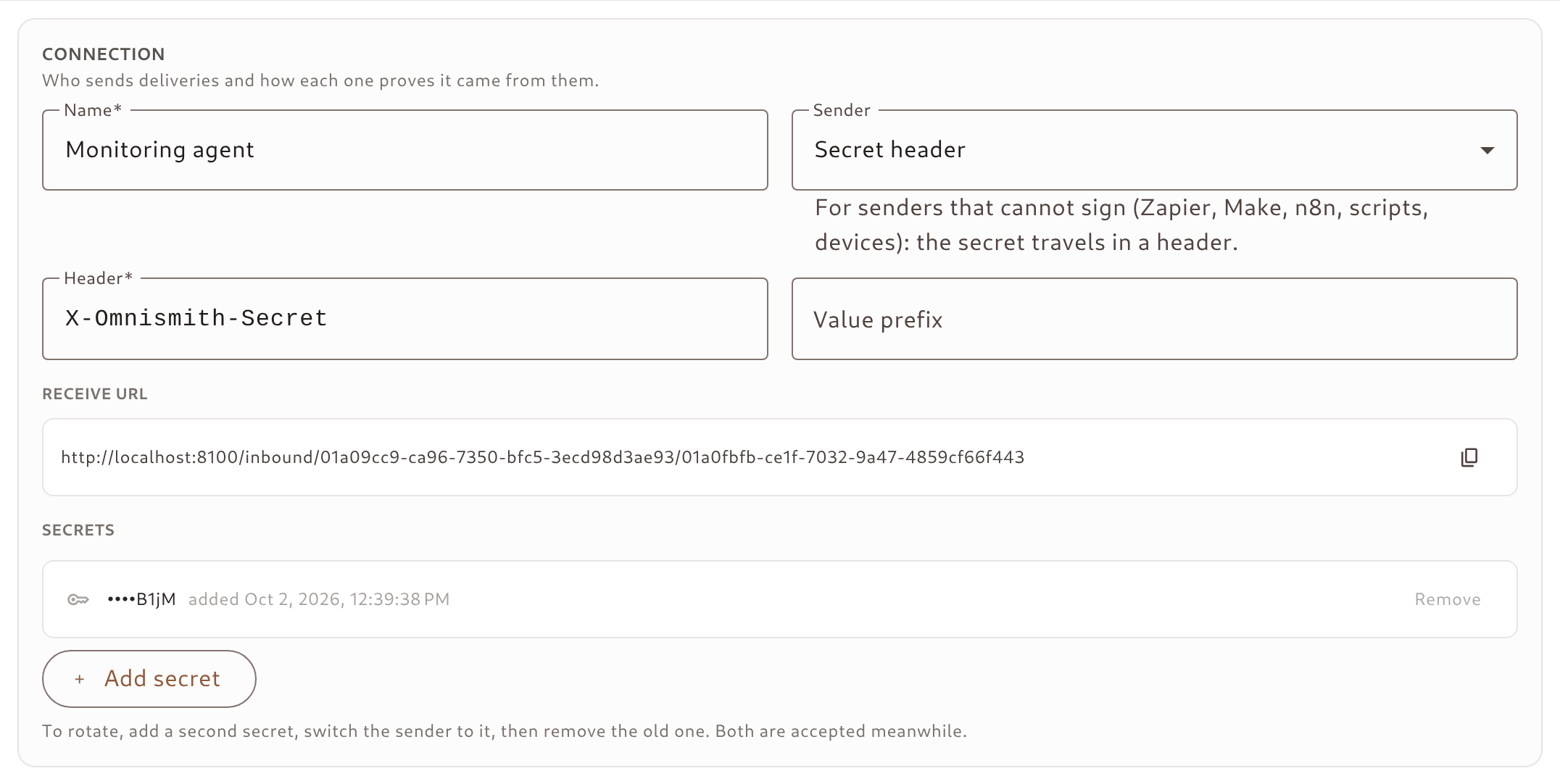
- Under Connection, enter a Name and pick the Sender. For a sender that signs with its own secret (Stripe, Shopify, Standard Webhooks, Lemon Squeezy), paste the signing secret it shows you; otherwise leave the secret empty and one is generated.
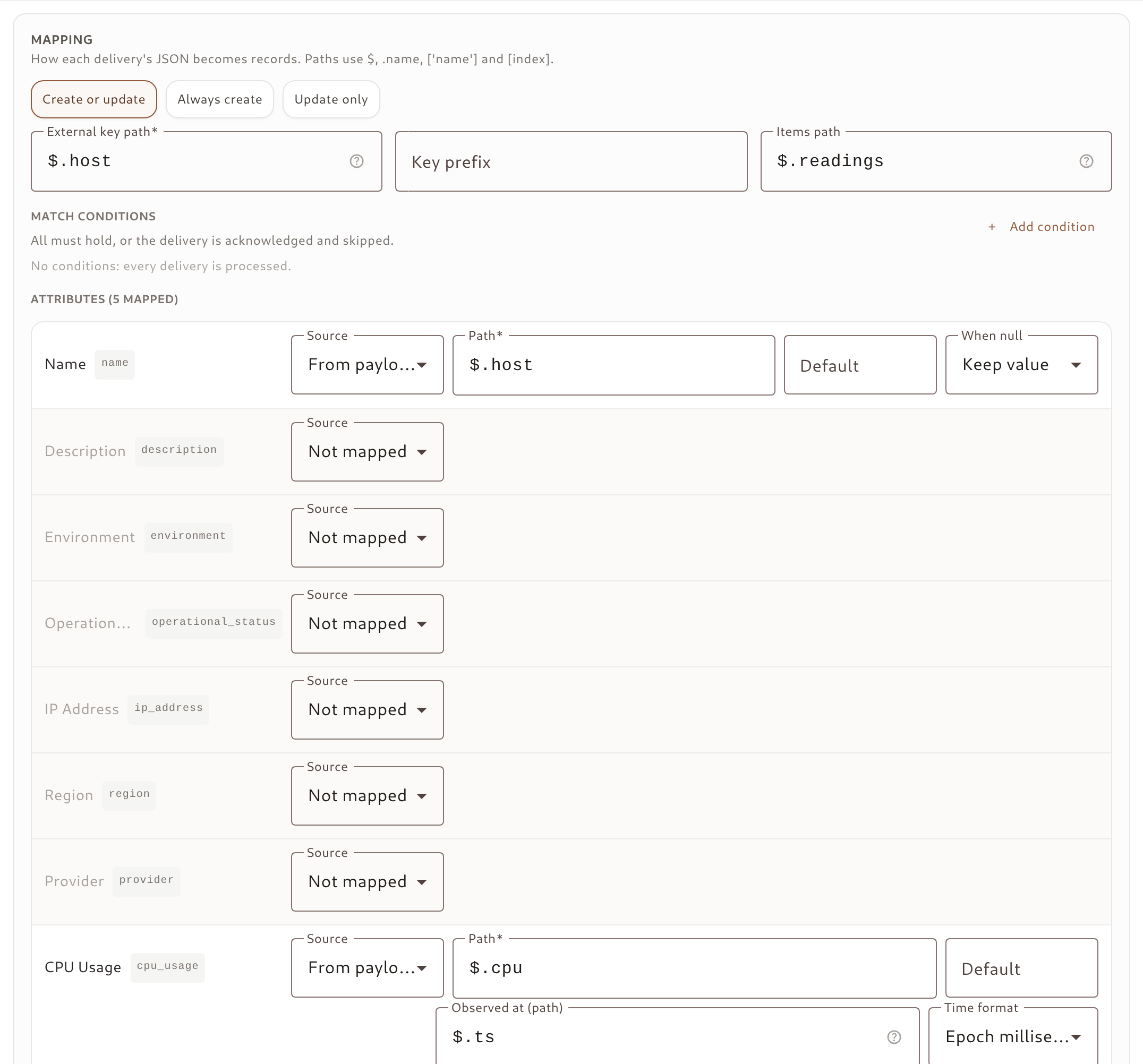
- Under Mapping, choose the mode, the external key path, and a source for each attribute you want to fill (see Mapping a Payload).
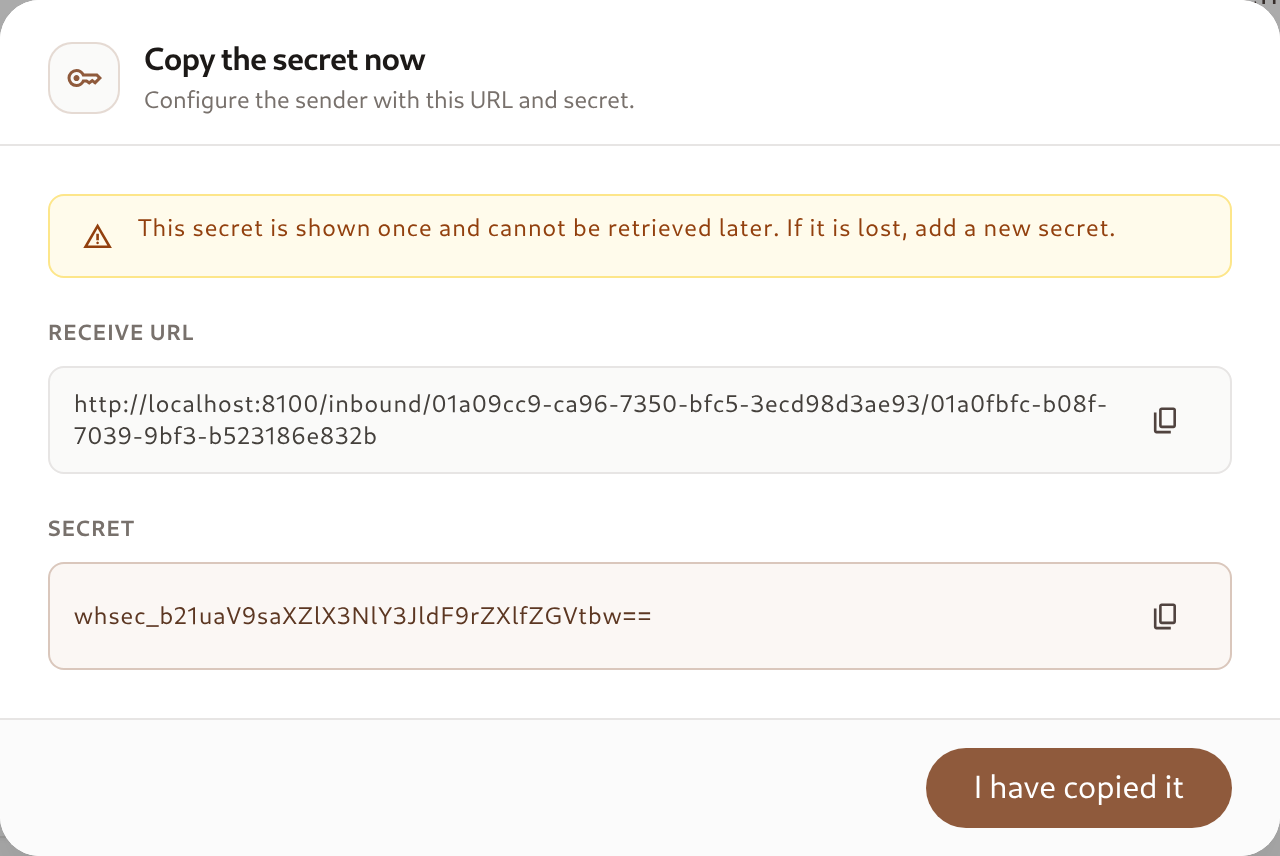
- Click Create endpoint. A one-time dialog shows the Receive URL and the Secret — copy both into the sender’s webhook settings now.
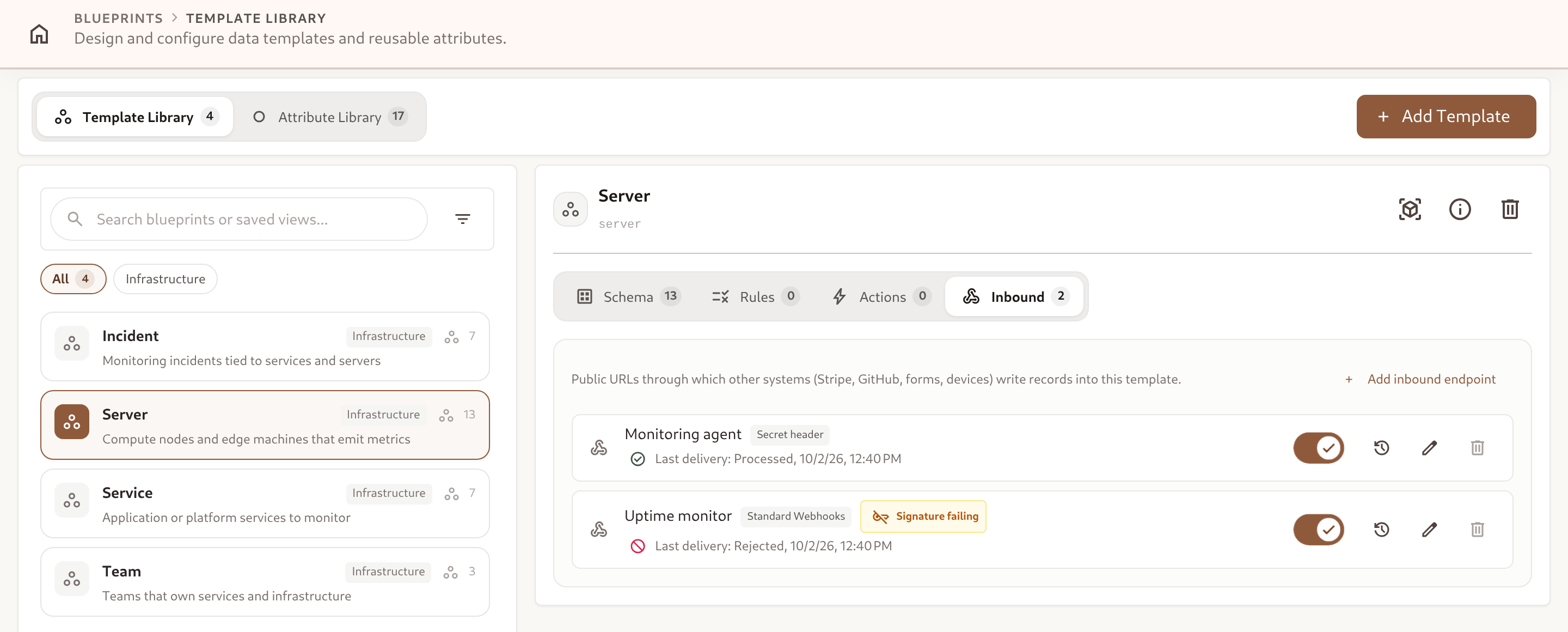
Each row shows the sender, an Accept deliveries toggle, the outcome and time of the last delivery, and buttons for the delivery log, editing and deleting. A Signature failing badge means a delivery failed signature verification after the last one that was processed — the sender is almost always using the wrong secret or header.
A disabled endpoint answers every delivery with 404. Deleting an endpoint stops its URL from accepting deliveries; records it already wrote are kept.
3. Sender Presets & Secrets
Section titled “3. Sender Presets & Secrets”Pick the preset that matches your sender. A preset fixes the signature header, format and algorithm, and fills in the sender’s delivery id when it has one.
| Sender preset | Signature header | Secret | Delivery id |
|---|---|---|---|
| GitHub | X-Hub-Signature-256 | Generated by Omnismith, or the one you set in the GitHub webhook | header X-GitHub-Delivery |
| Stripe | Stripe-Signature (timestamped, 5-minute window) | The endpoint’s signing secret from Stripe (whsec_…) | payload $.id |
| Shopify | X-Shopify-Hmac-Sha256 | The app’s webhook secret | header X-Shopify-Webhook-Id |
| Standard Webhooks | webhook-signature (symmetric v1, timestamped) | The sender’s whsec_… secret, or generated | header webhook-id |
| Lemon Squeezy | X-Signature | The webhook’s signing secret | — |
| Secret header | X-Omnismith-Secret by default, configurable, with an optional value prefix (e.g. Authorization + Bearer ) | Always generated | — (set one yourself) |
| Custom HMAC | Any header: algorithm (SHA-1/256/512), hex or base64, whole value / key=value list / versioned list, signed content over {body}, {timestamp} and {id}, replay window | Generated or provided | — (set one yourself) |
Use Secret header for senders that cannot sign a payload — Zapier, Make, n8n, shell scripts, microcontrollers. The sender simply includes the secret in a header on every request.
Secrets are shown once
Section titled “Secrets are shown once”The secret is displayed exactly once — in the dialog after you create the endpoint or add a secret — and is never shown again. Afterwards the endpoint only lists the last four characters and the date each secret was added. If a secret is lost, add a new one.
Rotating a secret
Section titled “Rotating a secret”An endpoint holds at most two secrets, and deliveries signed with either are accepted:
- In the endpoint’s Connection section, click Add secret (paste the sender’s new secret, or leave it empty to generate one) and copy it from the one-time dialog.
- Switch the sender to the new secret.
- Click Remove on the old secret. An endpoint always keeps at least one.
4. Mapping a Payload
Section titled “4. Mapping a Payload”The mapping turns each delivery’s JSON into one or more records.
| Mode | Behaviour |
|---|---|
Create or update (upsert) | Finds the record by its external key and updates it, or creates it with that key. Retries and repeated events always land on one record. Recommended. |
Always create (create) | Every delivery creates new records. |
Update only (update) | Only updates records found by external key; a key no record holds is a record error. |
Key, items and match conditions
Section titled “Key, items and match conditions”- External key path — where the sender’s id for the record is, e.g.
$.data.object.id. An optional Key prefix (e.g.stripe:) namespaces keys when several senders feed one template. - Items path — optional path to a list, e.g.
$.readings. Each element becomes its own record (at most 100 per delivery). Inside an item,$is the element and$rootis the whole payload. - Match conditions — optional conditions on the whole payload, all of which must hold (
equals,does not equal,is one of,exists,does not exist). Use them to accept only the event types you care about; any other delivery is acknowledged and skipped. Values compare strictly:"1"is not1.
Paths support $, .name, ['name'] and [index] — for example $.data.object.email or $.items[0].sku.
Attributes
Section titled “Attributes”The mapping lists every attribute of the template. For each one, choose a Source:
- Not mapped — deliveries never touch it.
- From payload — a Path, plus an optional Default (used when the path is absent or
null) and When null (Keep value, the default, orClear value). - Constant — a fixed value written on every delivery (e.g. a
sourceattribute set tostripe).
How values are resolved:
| Attribute kind | Resolution |
|---|---|
| Text, number, boolean | Taken as sent. |
| List | Matched to an option by label, case-insensitive (or by option id). Options are never created; an unknown label is a record error. |
| Reference | The value (after an optional Key prefix) is looked up as an external key of the referenced template. |
| Date / datetime | Read like any date or datetime value (no offset means UTC), or parsed with a Format: ISO 8601, epoch seconds or epoch milliseconds. |
| Metric | A number, appended as a reading. Observed at (path) and Time format take the reading’s time from the payload; without it, the receive time is used. |
Testing with Preview
Section titled “Testing with Preview”The Test section runs the mapping — including unsaved changes — on a sample payload and shows what each record would become. Nothing is written. Paste a sample event from the sender’s webhook documentation, or click Use a recent delivery to load one from the log, then click Preview.
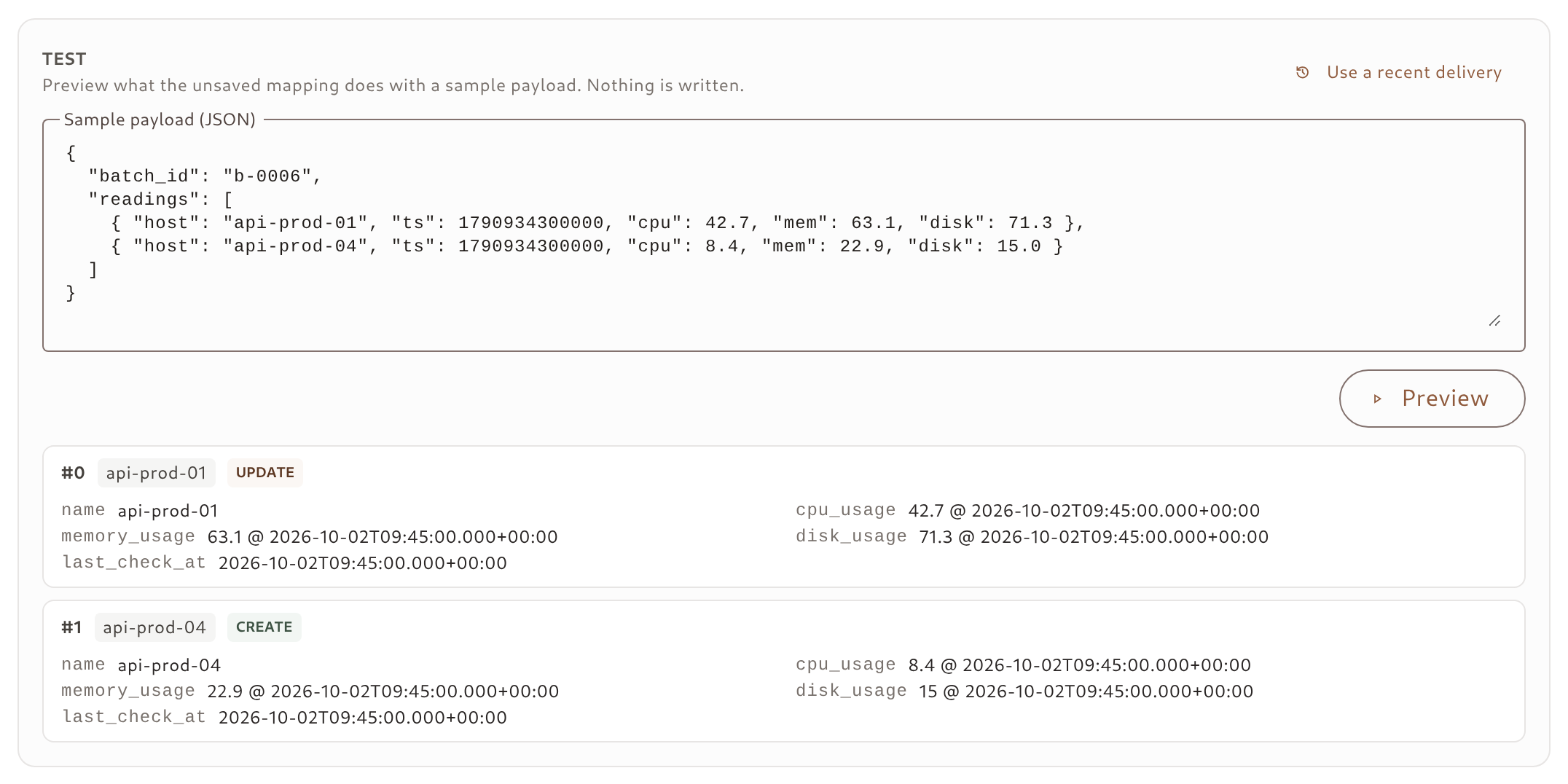
Each record shows its external key, whether it would be a Create or an Update, and the resolved values. Errors (an unknown list label, a rule that would be violated, a value of the wrong type) appear next to the attribute they belong to.
Delivery id
Section titled “Delivery id”The Delivery id section names where the sender puts its own id for a delivery — a header or a payload path. Presets fill it in. A delivery whose id was already processed in the last 7 days is acknowledged and skipped, so a sender’s retry is never applied twice.
5. What the Sender Receives
Section titled “5. What the Sender Receives”| Status | Body status | Meaning | Sender should |
|---|---|---|---|
200 | processed | Every record was written. | — |
200 | partial | Some records of a multi-record delivery failed; errors and items say which. | Not retry — fix the mapping and replay the delivery. |
200 | skipped | Nothing was written: reason is match (conditions did not hold), no_items (empty list) or duplicate (delivery id already processed). | — |
400 | — | The body is not a JSON object or array. | Fix the payload. |
401 | — | The signature is missing or wrong; reason is missing_signature, malformed_signature, mismatch or stale_timestamp. | Fix the secret or header. |
404 | — | No enabled endpoint at this URL. | Check the URL and the Accept deliveries toggle. |
413 | — | The body is over 1 MB. | Split the delivery. |
422 | — | No record could be written; errors are keyed per record, e.g. items[0].attributes.tier. | Fix the mapping or the payload. |
409, 429, 5xx | — | The delivery could not be written right now (a key conflict, a quota or rate limit). | Retry later. |
Every answer after signature verification carries log_id, the delivery’s row in the endpoint’s delivery log, so a sender-side log entry can be matched to the Omnismith one:
{ "status": "partial", "entity_ids": ["01a0f0e2-7c1a-7000-8000-000000000021", "01a0f0e2-7c1a-7000-8000-000000000023"], "items": [ { "index": 0, "entity_id": "01a0f0e2-7c1a-7000-8000-000000000021", "created": false, "error": null }, { "index": 1, "entity_id": null, "created": null, "error": { "type": "error/validation", "title": "Validation Failed", "status": 422, "detail": "key: unknown_key: no record holds the external key 'api-prod-03', and mode 'update' does not create one.", "errors": { "key": ["unknown_key: no record holds the external key 'api-prod-03', and mode 'update' does not create one."] } } }, { "index": 2, "entity_id": "01a0f0e2-7c1a-7000-8000-000000000023", "created": false, "error": null } ], "errors": { "items[1].key": ["unknown_key: no record holds the external key 'api-prod-03', and mode 'update' does not create one."] }, "log_id": "01a0f0e2-7c1a-7000-8000-0000000000d1"}A partial delivery answers 200 on purpose. Retrying it would re-send the records that already succeeded — and duplicate their metric readings — while the failed ones are almost always mapping problems that no retry fixes. They stay in the log until you replay them.
6. The Delivery Log & Replay
Section titled “6. The Delivery Log & Replay”Click the history icon on an endpoint’s row to open its Delivery log. It lists every delivery from the last 7 days, newest first: received time, outcome (Processed, Partial, Skipped, Rejected, Failed), HTTP status, delivery id, number of records and duration. Filter by outcome and by date from the toolbar.
Selecting a delivery shows its record errors, links to the records it wrote, the stored headers (content type, user agent and the delivery id header) and the pretty-printed body.
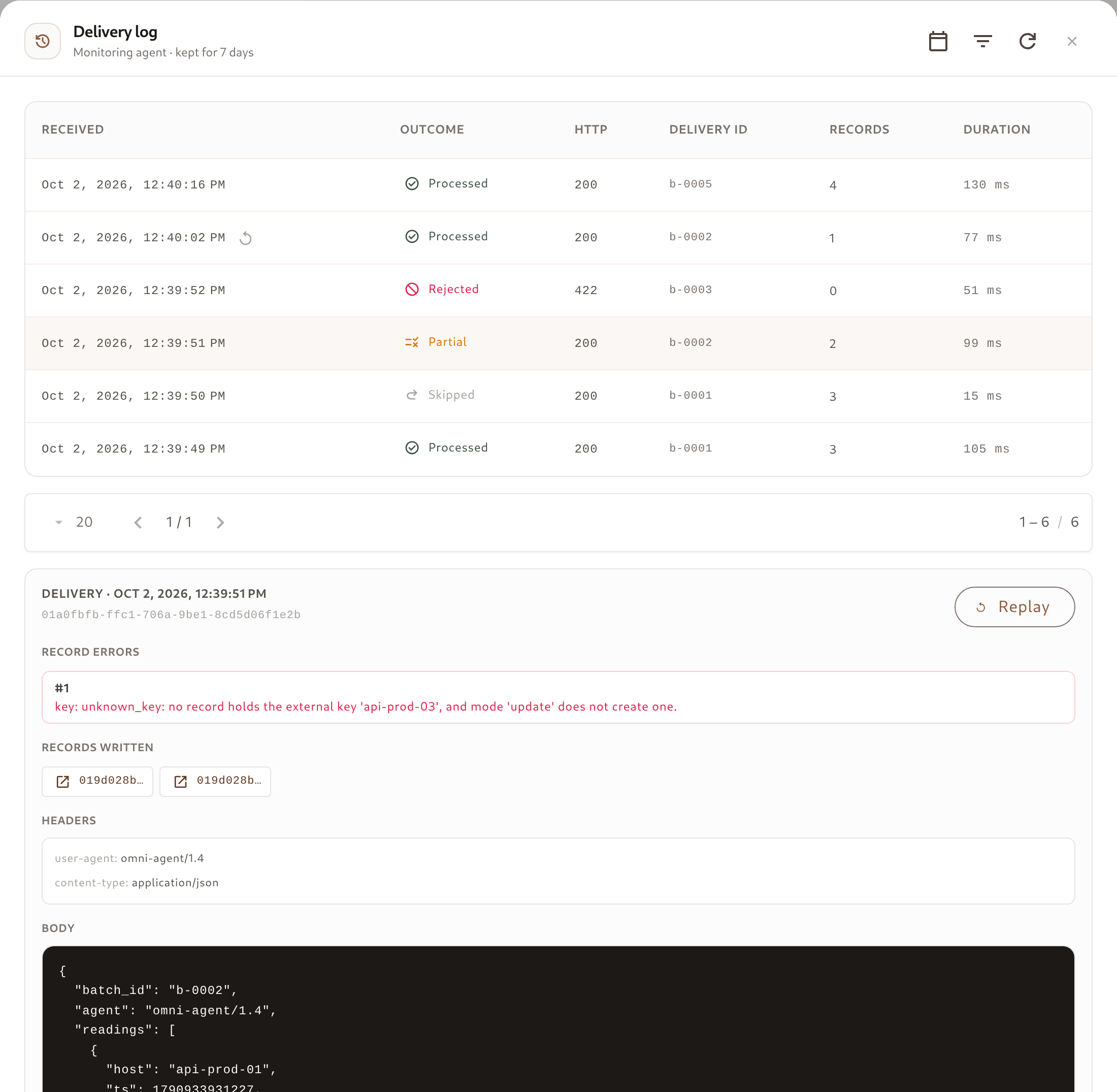
Replay re-runs a stored delivery through the endpoint’s current mapping and writes the records — the way to recover after you fix the mapping or the template:
- It is offered for Rejected, Failed and Partial deliveries. For a partial one, only the records that failed are re-run.
- The replay gets its own row in the log, marked with a replay icon, recording which delivery it replays and who asked for it. Records are still attributed to the endpoint.
- A delivery without a stored body cannot be replayed: signature failures are logged without one, and bodies over 256 KB are stored truncated.
- Processed and skipped deliveries are not replayed; to apply one again, re-send it from the sender.
Signature failures are logged too, without their body and at most one row per endpoint every 10 seconds, so a wrong secret is visible without unauthenticated traffic filling the log.
7. Worked Examples
Section titled “7. Worked Examples”Stripe customers → Customer template
Section titled “Stripe customers → Customer template”A Customer template with email (text), name (text) and tier (list: Free, Pro, Team). Create an endpoint with the Stripe preset, paste the endpoint’s signing secret from the Stripe dashboard, and use this mapping:
{ "mode": "upsert", "match": [{ "path": "$.type", "operator": "in", "value": ["customer.created", "customer.updated"] }], "key": { "path": "$.data.object.id", "prefix": "stripe:" }, "attributes": { "email": { "path": "$.data.object.email" }, "name": { "path": "$.data.object.name" }, "tier": { "path": "$.data.object.metadata.tier", "default": "Free" } }}customer.createdcreates the record with the keystripe:cus_…; every latercustomer.updatedupdates the same record.- Other Stripe event types are acknowledged and skipped by the match condition.
- The preset reads Stripe’s event id (
$.id) as the delivery id, so Stripe’s automatic retries are never applied twice. - A tier label that is not one of the list’s options becomes a record error, visible in the log; add the option, then replay.
A device posting a batch of readings → Server template
Section titled “A device posting a batch of readings → Server template”A monitoring agent that cannot sign payloads posts a batch of readings every minute. Use the Secret header preset and this mapping:
{ "mode": "upsert", "items": "$.readings", "key": { "path": "$.host" }, "attributes": { "name": { "path": "$.host" }, "cpu_usage": { "path": "$.cpu", "timestamp": { "path": "$.ts", "format": "epoch_ms" } }, "memory_usage": { "path": "$.mem", "timestamp": { "path": "$.ts", "format": "epoch_ms" } }, "disk_usage": { "path": "$.disk", "timestamp": { "path": "$.ts", "format": "epoch_ms" } }, "last_check_at": { "path": "$.ts", "format": "epoch_ms" } }}with the delivery id read from the payload ($.batch_id). The agent sends:
curl -X POST "https://api.omnismith.io/v1/inbound/$PROJECT_ID/$ENDPOINT_ID" \ -H "Content-Type: application/json" \ -H "X-Omnismith-Secret: omni_in_demo_secret_key_12345" \ -d '{ "batch_id": "b-0005", "readings": [ { "host": "api-prod-01", "ts": 1790934016000, "cpu": 39.6, "mem": 62.8, "disk": 71.2 }, { "host": "db-prod-01", "ts": 1790934016000, "cpu": 70.3, "mem": 82.0, "disk": 88.8 } ] }'Each reading updates the server whose external key is its hostname — or creates it the first time a new host reports — and appends CPU, memory and disk readings at the time the agent measured them, not the time they arrived.
8. Limits
Section titled “8. Limits”| Limit | Value |
|---|---|
| Body size | 1 MB per delivery (413 above) |
| Records per delivery | 100 items (422 too_many_items above) |
| Attributes per mapping | 100 |
| Delivery rate | About 10 deliveries per second per endpoint, with short bursts absorbed (429 above) |
| Secrets per endpoint | 2 (during rotation) |
| Delivery log & duplicate detection | 7 days |
| Stored body for replay | First 256 KB |
Records, updates and metric readings written by an endpoint count toward your plan exactly as if they were written through the API — see Billing and Usage. When a quota is exhausted, deliveries are answered with 429 so the sender retries later.
9. Managing Endpoints from an AI Agent
Section titled “9. Managing Endpoints from an AI Agent”Every operation in this page is also available to AI agents through the MCP connector: an agent that scaffolds a template can create its endpoint (create_template_inbound_endpoint), check the mapping on a sample event (preview_inbound_mapping), hand you the URL and secret once, and after a test event read the log (list_inbound_deliveries, get_inbound_delivery), fix the mapping and replay_inbound_delivery. get_schema_overview lists each template’s endpoints.